OXVA Xlim SQ Pro 2 Review: Specs, Verdict, and Fixes for When It Stops Working
22nd Oct 2026
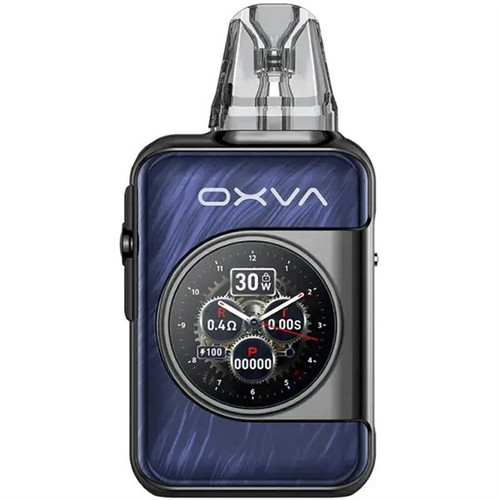
This OXVA Xlim SQ Pro 2 review covers the full specs, what it's worth to you day to day, and what to do if it stops working, including the exact messages it shows on screen when something's wrong. The kit is built around a 1.09-inch touchscreen, a feature that still sets it apart from most pod kits at this price.
OXVA Xlim SQ Pro 2 Specs
Here's the full spec sheet, pulled directly from the current UK listing, useful if you're weighing this kit against anything else in the same price bracket.
|
Spec |
Detail |
|
Battery |
1600mAh |
|
Wattage range |
5-30W |
|
Display |
1.09-inch touchscreen |
|
Modes |
Smart, Eco, manual, with a 30-day puff diary and 5-digit puff counter |
|
Pod capacity |
2ml |
|
Included coils |
0.6Ω (RDTL, pre-installed), 0.8Ω (MTL, spare) |
|
Full resistance range available |
0.4Ω to 1.2Ω across the Xlim pod range |
|
Pod compatibility |
Xlim Top Fill, EZ, V2, and V3 pods |
|
Charging |
USB-C, around 45 minutes |
|
Airflow |
Side-slider, adjustable between MTL and RDTL |
|
Dimensions |
93.4 x 20 x 48mm, 114g |
What the Xlim SQ Pro 2 Is Like to Use
The touchscreen is the thing that separates the Xlim SQ Pro 2 from a standard button-and-battery pod kit. Smart Mode reads your draw and adjusts output automatically rather than firing at one fixed wattage regardless of how hard you pull, Eco Mode trims power to stretch battery life, and the puff diary logs usage over 30 days if you want to track it.
The screen also shows live wattage and the resistance of whichever pod is fitted, so you can see at a glance what the device is set to rather than guessing from a single LED colour. None of that is essential to vaping, but it's a genuine step up from the single on-off button most kits at this price offer.
There are real trade-offs worth naming plainly. The 2ml pod capacity is on the smaller side, so expect more frequent refills than some rivals in the same price bracket. The menu has more depth than a one-button device, so there's a short learning curve before swipe shortcuts start feeling natural. And the top-fill plug on the pod is fiddly for some users, tight enough that a few reviewers reach for tweezers to seat it properly.
Against that, the pods themselves consistently get good marks for flavour and longevity, with one reviewer getting over 4,000 puffs from a single pod without the taste dropping off. The battery holds up for a full day of typical use between charges. Reported problems with leaking, burnt taste, or the screen failing are rare across the reviews we checked. The most common complaint is runtime falling slightly short of what the 1600mAh capacity suggests on paper, not a hardware fault, just a battery that empties a bit faster than the spec sheet implies.
Is the OXVA Xlim SQ Pro 2 Worth It?
It suits someone who wants more control and feedback than a basic auto-draw pod kit offers, without stepping up to a full box mod. The variable wattage, adjustable airflow, and Smart Mode give you room to tune the draw to your preference, and the puff counter is a genuinely useful way to track usage if you like keeping tabs on it.
If you want the simplest possible device, one button, nothing to configure, you're better served by a plainer pen or pod kit. The touchscreen and menu structure are the whole point of this kit, so they're wasted on someone who just wants to charge it, fill it, and never open a settings screen. It's a kit for someone who already knows what resistance and wattage they like, and wants the device to show and confirm that rather than hide it behind a single light.
GoSmokeFree sells more of the Xlim SQ Pro 2 than almost any other pod kit in the range, which tracks with how easy it is to recommend: the spec sheet backs up the price, and the trade-offs above are minor enough that they rarely change anyone's mind once they've tried it.
If you're already restocking Xlim pods and comfortable adjusting airflow and wattage to taste, the step up from a plainer Xlim kit is small in price and noticeable in day-to-day use. If you're still deciding between your first few kits and don't yet have a preference for MTL over RDTL, the adjustable airflow here means you can work that out on one device rather than buying twice.
OXVA Xlim SQ Pro 2 Not Working: What the Screen Errors Mean
Unlike older pod kits that communicate faults through a blinking LED you have to look up, the Xlim SQ Pro 2 shows a plain-text message on its touchscreen when something stops it from firing. Match what you're seeing against the table below.
|
Screen message |
What it means |
What to do |
|
Low Battery |
Voltage has dropped under 3.2V and the device has stopped firing |
Charge via USB-C; it won't fire again until it's topped up |
|
No Atomizer |
The pod isn't being detected |
Remove and reseat the pod, and check the gold contact points for e-liquid residue or lint |
|
Short |
A short circuit in the coil has been detected |
Swap in a fresh pod first, before anything else. If a new pod trips the same error, the issue is the device's connector, not the pod |
|
Time Out |
A single draw has run past 8 seconds, which is a built-in safety cutoff, not a fault |
Release the fire button or stop drawing, then start again |
|
Temp High |
The internal temperature protection has tripped |
Let the device sit and cool before using it again |
|
Locked |
Four clicks on the fire button within two seconds locks it, to stop accidental firing in a pocket or bag |
Click the fire button four times again to unlock it |
Most of these clear themselves once you've done the obvious thing (charge it, reseat the pod, let it cool). A Short error that persists across more than one fresh pod is the one genuinely worth raising with wherever you bought it, since it points to the device rather than a single faulty pod.
A new pod that tastes burnt or weak in its first few puffs usually isn't an error at all. Give it 5 to 8 minutes after filling before you vape on it, so the coil has time to properly soak up the e-liquid. Firing it dry or too soon after filling is one of the more common reasons a perfectly good pod tastes burnt, and it's easy to mistake for a fault with the device itself.
Which Pods and Coils Does It Use?
The Xlim SQ Pro 2 takes OXVA's wider Xlim pod range rather than a kit-specific pod, which is why it ships with both a 0.6Ω RDTL pod and an 0.8Ω MTL pod in the box. If you preferred the tighter, more cigarette-like draw of the 0.8Ω pod, stick with the higher resistances; if you preferred the looser 0.6Ω pod, the lower resistances in the range will suit you better. Xlim V3 replacement pods cover 0.4Ω to 1.2Ω depending on which end of that range you want. If you're restocking more broadly, the full OXVA coil range covers pods for this kit and the rest of OXVA's lineup.
If you're still deciding whether this is the right kit, you can check current pricing and stock directly on the product page, and our OXVA brand spotlight covers where it fits alongside the rest of the range.